Keybindings
How it works
Bindings resolve through six layers: the YAML config → the server keybindings API
→ keyboard.ts → key events → LocalPlayerController → ClientMessage /
IntentCollector. Any slash command can also be bound to a key.
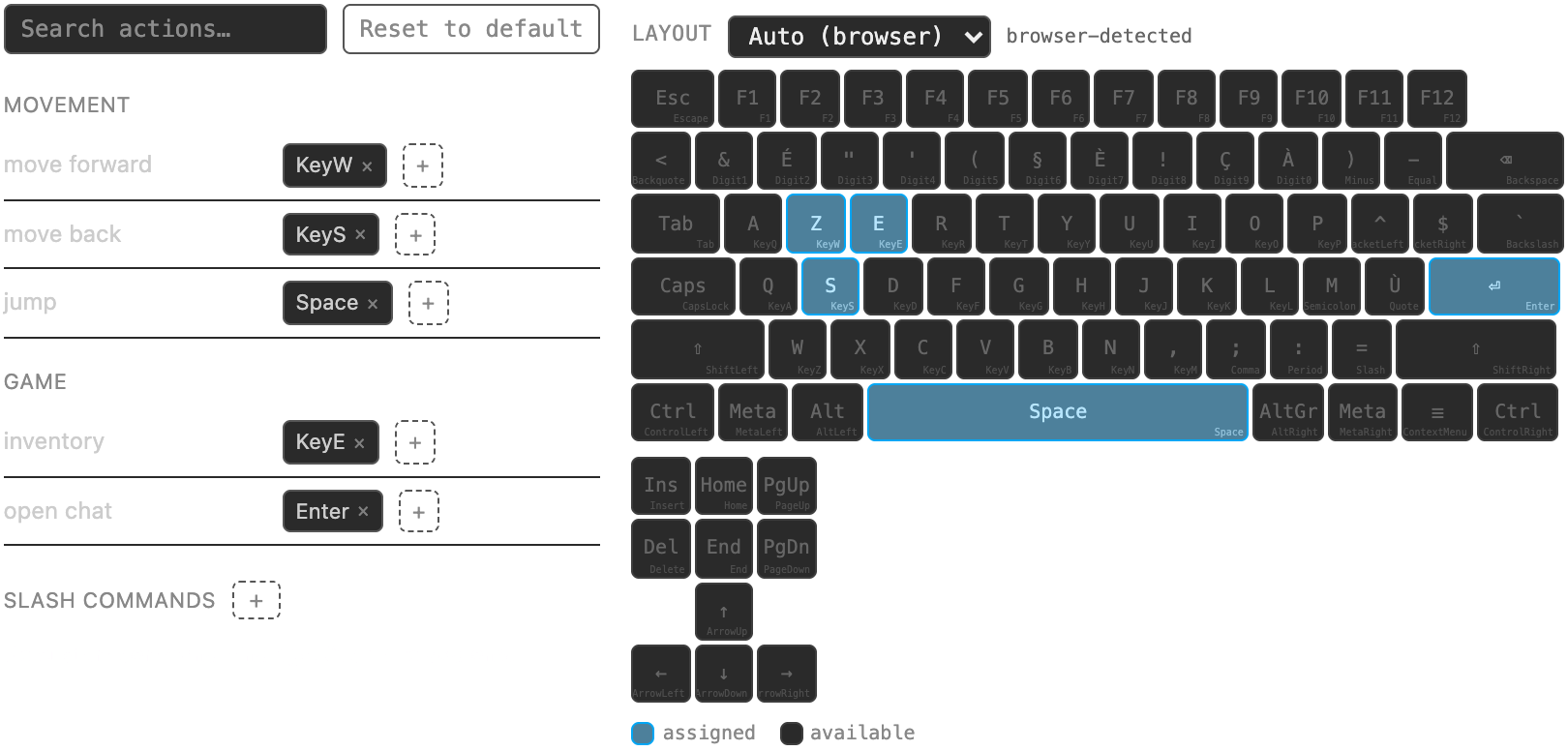
- Rebind in-game: Preferences → Keybindings (
Cmd/Ctrl+Shift+K). - A player's saved bindings live in their player file; defaults come from the config below.
| Route | Purpose |
|---|---|
GET /api/keybindings |
a player's saved bindings (?player=) or the default config |
PUT /api/admin/players/{name}/keybindings |
overwrite a player's bindings |
Configuration
data/config/keybindings.yaml (bundled default resources/config/keybindings.yaml,
schema keybindings.schema.json). Keys use DOM KeyboardEvent.code names with
optional Ctrl+ / Alt+ / Cmd+ / Shift+ modifiers; a list gives alternates;
Key+Key is a double-tap.
movement:
  forward: [KeyW, ArrowUp]
  sneak: [ShiftLeft]
  auto_forward: ["KeyW+KeyW"]
flight:
  fly_toggle: ["Space+Space"]
Reload with /reload.
Default keybindings
Defined in data/config/keybindings.yaml (bundled defaults in resources/config/). Players override their own bindings in-game; any slash command can be bound too.
| Group | Action | Default keys |
|---|---|---|
movement |
forward |
KeyW, ArrowUp |
movement |
backward |
KeyS, ArrowDown |
movement |
strafe_left |
KeyQ, ArrowLeft |
movement |
strafe_right |
KeyE, ArrowRight |
movement |
rotate_left |
KeyA, Ctrl+ArrowLeft |
movement |
rotate_right |
KeyD, Ctrl+ArrowRight |
movement |
rotate_up |
Alt+ArrowUp |
movement |
rotate_down |
Alt+ArrowDown |
movement |
sneak |
KeyZ |
movement |
crawl |
KeyC |
movement |
auto_forward |
KeyW+KeyW, ArrowUp+ArrowUp |
movement |
speed_down |
F3 |
movement |
speed_up |
F4 |
flight |
fly_toggle |
Space+Space |
flight |
ascend |
Space |
flight |
descend |
KeyZ |
combat |
combat_target_cycle |
Tab |
combat |
combat_attack |
KeyV |
combat |
npc_interact |
KeyX |
combat |
vehicle_mount |
Ctrl+KeyX |
combat |
tame |
Alt+KeyT |
combat |
pet_dismiss |
Alt+KeyP |
combat |
siege_weapon_rotate |
KeyR |
combat |
siege_weapon_pitch |
Alt+KeyR |
combat |
siege_weapon_power |
Ctrl+KeyR |
combat |
siege_weapon_fire |
KeyX |
combat |
protect |
|
building |
place_rotate |
KeyR |
building |
block_interact |
KeyX |
building |
actionblock_edit |
Alt+KeyB |
building |
scene_confirm |
Enter |
building |
scene_cancel |
Escape |
building |
claim_mark_corner |
KeyL |
building |
claim_cancel_selection |
Escape |
building |
undo |
Ctrl+KeyZ, Cmd+KeyZ |
game |
view_toggle |
KeyF |
game |
console_toggle |
KeyH |
game |
inventory |
KeyI |
game |
character |
KeyY |
game |
health_bar |
KeyB |
game |
craft |
Alt+KeyC |
game |
attack_panel_toggle |
KeyU |
game |
ingame_map |
m |
game |
quest_journal |
Alt+KeyQ |
game |
quest_tracking |
KeyT |
game |
claim_panel |
KeyK |
game |
group_panel |
Alt+KeyG |
game |
guild_panel |
KeyG |
game |
faction_panel |
Ctrl+KeyG |
game |
toggle_compass |
F5 |
ui |
minimap_zoom_in |
F1 |
ui |
minimap_zoom_out |
F2 |
ui |
screenshot |
F7 |
preferences |
preferences |
Cmd+Shift+Comma, Ctrl+Shift+Comma |
preferences |
preferences_keybindings |
Cmd+Shift+KeyK, Ctrl+Shift+KeyK |
preferences |
preferences_debug |
Cmd+Shift+KeyD, Ctrl+Shift+KeyD |
preferences |
preferences_graphics |
Cmd+Shift+KeyG, Ctrl+Shift+KeyG |
preferences |
layout_editor |
F6 |
debug |
statistics_toggle |
F8 |
debug |
dump_stats |
F9 |
debug |
chunk_debug_toggle |
F10 |
hotbar |
slot_1 |
Digit1 |
hotbar |
slot_2 |
Digit2 |
hotbar |
slot_3 |
Digit3 |
hotbar |
slot_4 |
Digit4 |
hotbar |
slot_5 |
Digit5 |
hotbar |
slot_6 |
Digit6 |
hotbar |
slot_7 |
Digit7 |
hotbar |
slot_8 |
Digit8 |
hotbar |
slot_9 |
Digit9 |
hotbar |
slot_10 |
Digit0 |
hotbar |
shortcut_page_prev |
: |
hotbar |
shortcut_page_next |
= |
hotbar |
shortcut_page_1 |
Ctrl+Digit1 |
hotbar |
shortcut_page_2 |
Ctrl+Digit2 |
hotbar |
shortcut_page_3 |
Ctrl+Digit3 |
hotbar |
shortcut_page_4 |
Ctrl+Digit4 |
hotbar |
shortcut_page_5 |
Ctrl+Digit5 |
hotbar |
shortcut_page_6 |
Ctrl+Digit6 |
hotbar |
shortcut_page_7 |
Ctrl+Digit7 |
hotbar |
shortcut_page_8 |
Ctrl+Digit8 |
hotbar |
shortcut_page_9 |
Ctrl+Digit9 |
hotbar |
shortcut_page_10 |
Ctrl+Digit0 |